
This API enables the developer to explicitly specify indices and query asset sources in the Jivox system. Situations that require complex processing of data signals to determine the asset source key, or situations that require lookup of multiple rows can benefit from this API.
Example Usage: To query for one row (for e.g. with key=5) from an asset source, use the name of the asset source (for e.g. NumbersTest) to configure the API call as shown below:
jvxAd.getDynamicService(
"NumbersTest:NumbersTest",
"ap_NumbersTest=5,
"callback");
To query for multiple rows from the same asset source, use two keys in the same call as shown below:
jvxAd.getDynamicService(
"NumbersTest:NumbersTest",
["ap_NumbersTest=3,5,7"],
"callback");
To query for multiple rows from multiple asset sources, use the syntax shown below:
jvxAd.getDynamicService([
["NumbersTest:NumbersTest", "DeepUploadTest: DeepUploadTest"],
["ap_NumbersTest=3,5,7", "ap_DeepUploadTest=s"],
"callback");
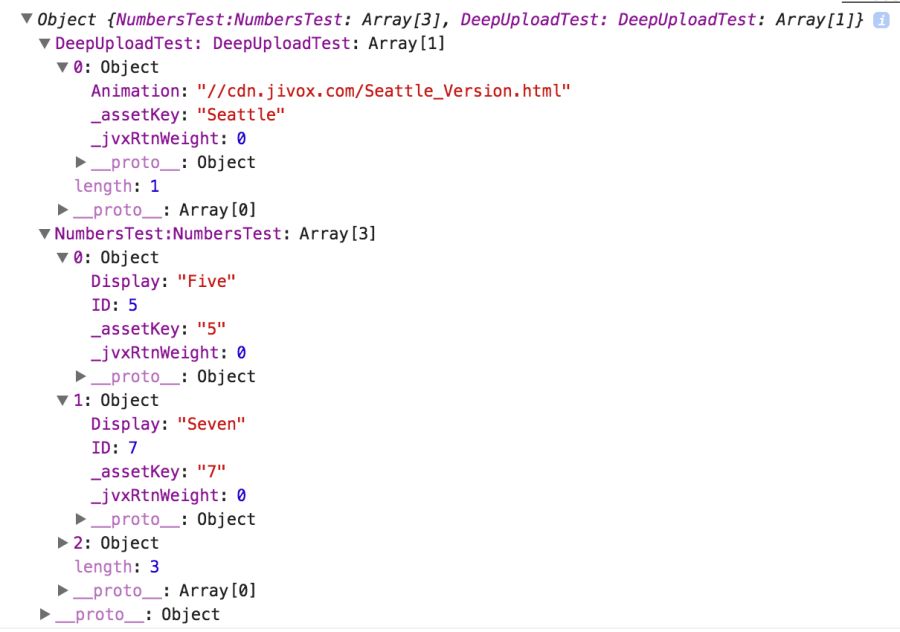
Response: A sample response object returning multiple rows from multiple asset sources is shown below:
Was this page helpful?